A Step-By Step Guide to How AI Reads Plansets
A 300-sheet plan set can take an estimator days to review by hand. AI can work through the same set in minutes, but it doesn't "look" at drawings the way a person does. It follows a structured sequence: break the set apart, classify each page, read the images & text, and turn it all into data you can price and build from.
Here's what happens at each step, and what it means for your team.
Step 1: Ingest and clean up the files
The process starts with your plan set. The AI splits multi-page files into individual pages, straightens skewed scans, and sharpens faded linework.
This step sounds basic, but it matters. A crooked scan or a low-resolution print can throw off every measurement that follows.
Step 2: Classify every sheet
Next, the AI reads each title block to pull the sheet number, sheet name, discipline, revision, and date. It sorts sheets into architectural, structural, civil, MEP, and so on, then builds a clean, searchable sheet index.
Step 3: Read the text and annotations
Using optical character recognition (OCR) trained on construction drawings, the AI extracts every piece of text: general notes, callouts, dimension strings, room names, door tags, and keynotes.
Step 4: Detect symbols and objects
Computer vision models then identify the graphic elements on each sheet: doors, windows, columns, footings, fixtures, outlets, grid lines, section cuts, and detail bubbles.
Each detected object gets a type, a location on the sheet, and a link to any tag or label next to it. A door symbol becomes "Door 104, Type B, Room 1.12."
Step 5: Establish scale and measure
The AI reads the scale on each sheet (or each viewport within a sheet) and calibrates against known dimensions. With scale set, it can measure lengths, areas, and counts: linear feet of wall, square feet of slab, number of light fixtures.
This is the foundation of automated takeoff.
Step 6: Cross-reference the whole set
This is where AI pulls ahead of a manual review. Plan sets are a web of references: a section cut on A-201 points to detail 5 on A-501, a door tag points to the door schedule, a keynote points to the spec section.
The AI follows every one of these links and checks that they resolve. It also compares disciplines against each other, for example, whether a structural column lines up with the architectural grid.
Step 7: Flag gaps and conflicts
Anything that doesn't add up gets flagged: a detail that's referenced but missing, a door tag with no schedule entry, a dimension that doesn't close, or a ceiling height that conflicts between architectural and mechanical sheets.
These flags become a review list your team can turn into RFIs before bid day, not during construction.
Step 8: Output structured data
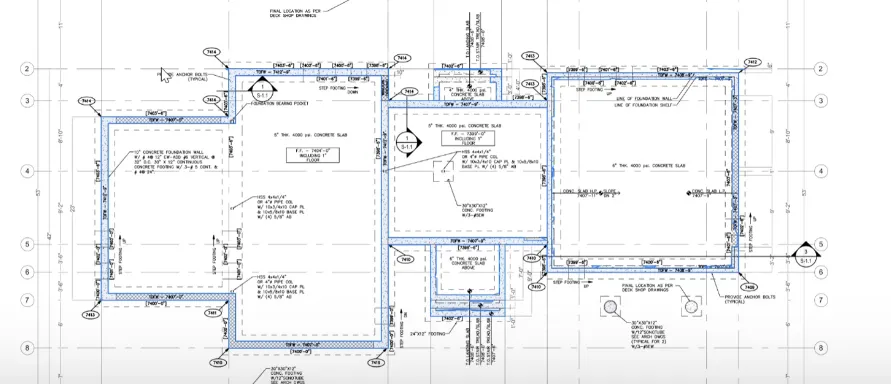
Finally, Your drawings and measurements on concrete foundations are displayed – helping you not only visually see how the AI did it’s measurements but allowing you to double check the math and the lines.
Where people still fit in
AI handles the volume. Your estimators and project managers handle the judgment. They review the flags, decide which issues matter, and apply the local knowledge, means and methods, and pricing experience no model has.
The result isn't fewer experts. It's experts who spend their time on decisions instead of page-flipping and using their expertise where it’s needed.